Run OpenClaw with a Bridge Crew—not a pile of terminals.

OCC Desktop is mission control for OpenClaw: build specialist crew members, delegate work to the right models, and keep your main agent unblocked while the real work gets done.

If you use OpenClaw seriously, this is the difference between one overloaded agent and a coordinated team you can actually steer.

  • Delegate with intent: explicit roles, clear ownership, quick reassignment
  • Stay cost-aware: route simpler work to cheaper models and catch spend early
  • Keep the captain free: the main agent stays available for planning, pivots, and decisions
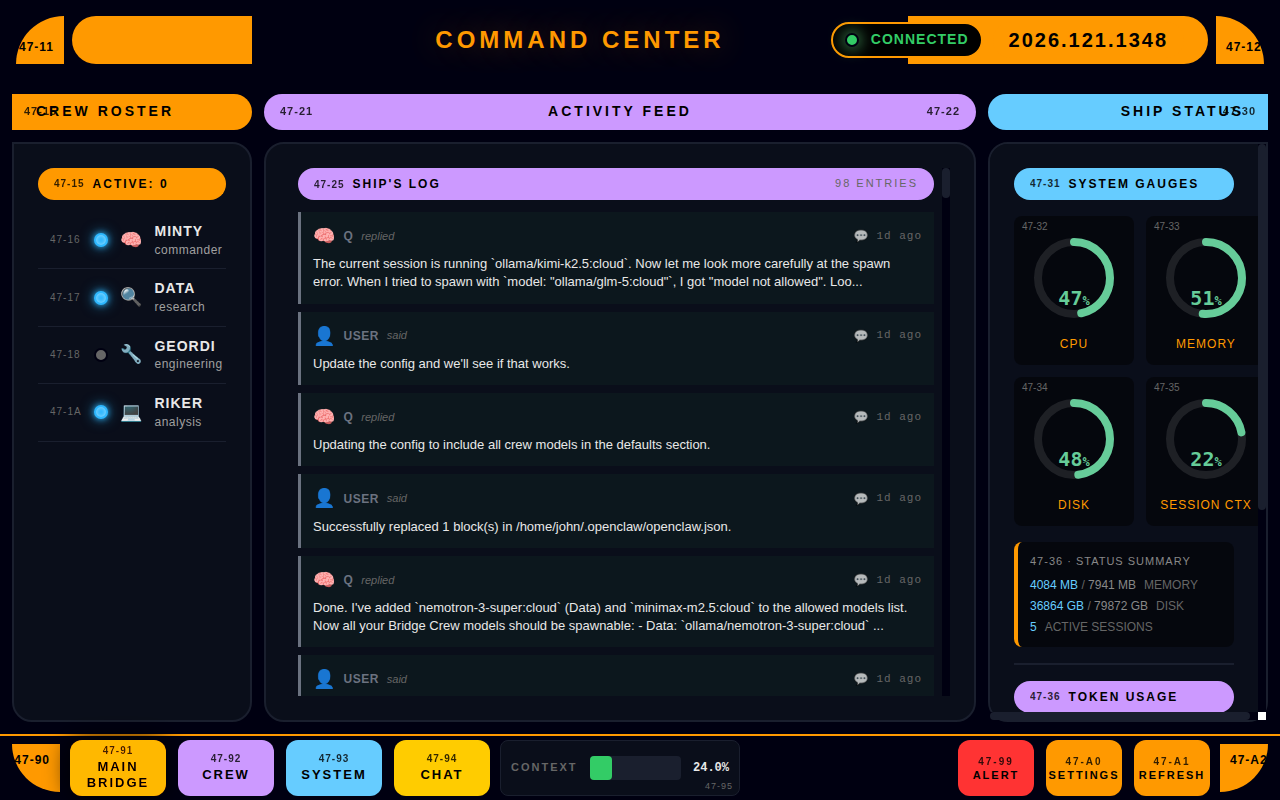
OCC Desktop Main Bridge dashboard

Everything you need to run the Bridge

Bridge Dashboard

See what the crew is doing right now.

The Bridge view gives you the operational truth screen OpenClaw is missing by default. Sessions, crew status, system health, and pairing state stay visible, so delegation is observable instead of wishful thinking.

  • Live sessions with quick status context
  • Crew availability and assignment visibility
  • High-level health indicators you can trust at a glance

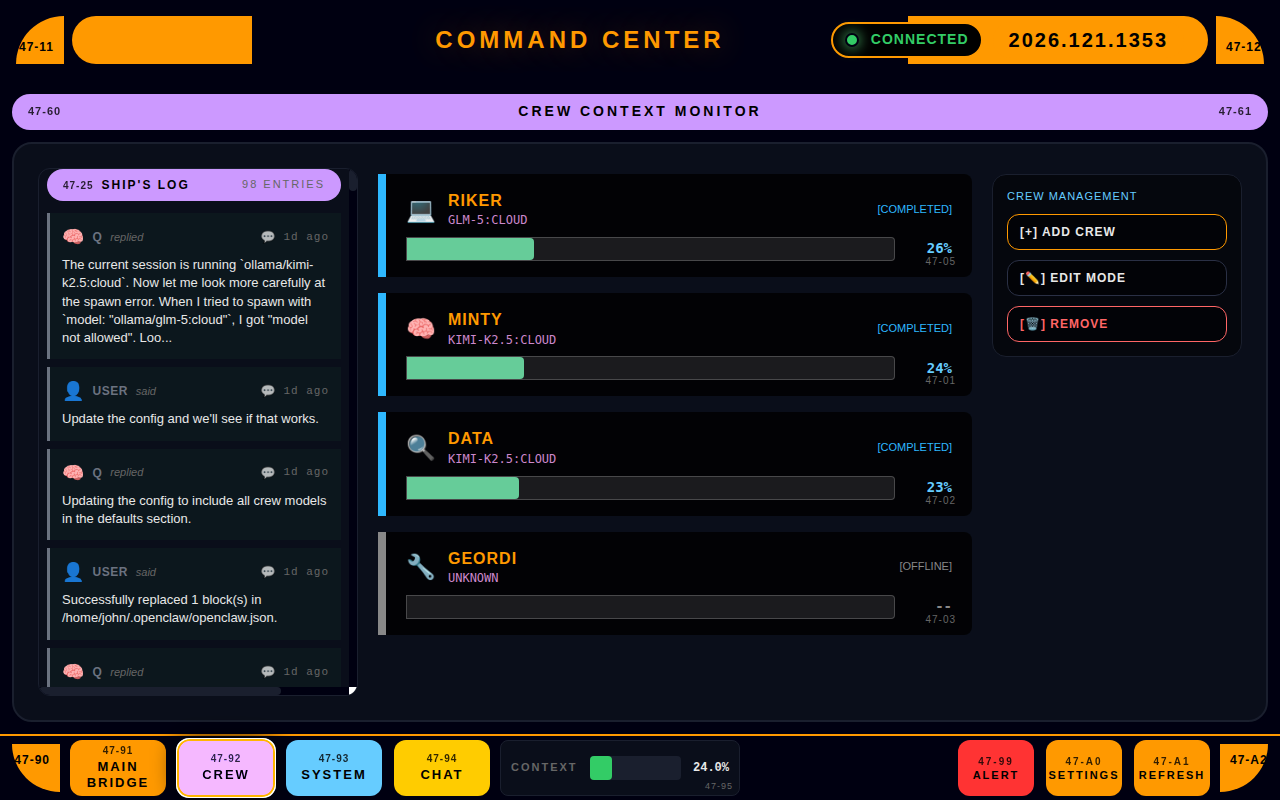
Bridge Crew Management

Create specialists, not one overloaded generalist.

Build named crew members with clear responsibilities and map each role to the right model. Use fast, cheap models for easier work, stronger models for harder work, and specialist models where they actually matter.

  • Add/remove crew members (Data, Geordi, Riker, etc.)
  • Assign and update model mappings per crew member
  • Keep responsibilities explicit and easy to change

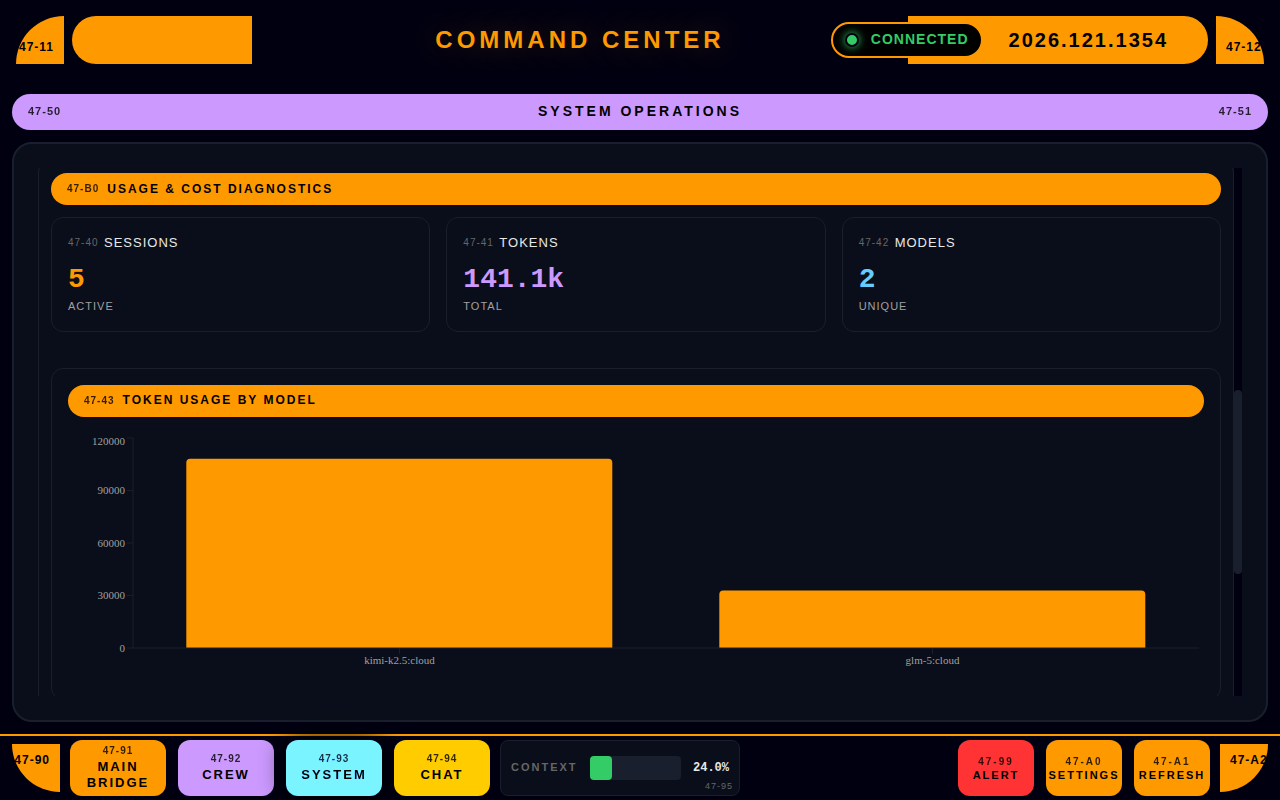
Usage & Cost Diagnostics

Steer the spend before it bites.

Multi-model workflows get expensive fast when you can't see what changed. OCC Desktop centralizes usage across models and providers so you can spot runaway sessions, compare tradeoffs, and route work more intelligently.

  • Usage tracking across models and providers
  • Cost-oriented views for quick "what changed?" answers
  • Helps identify heavy workflows and expensive delegation patterns

System Operations (CPU / Memory / Disk)

Correlate "it feels slow" with reality.

When performance dips, you need proof, not vibes. OCC Desktop pulls live CPU, memory, and disk signals so you can tell whether the bottleneck is the machine, the model, or the workload.

  • CPU / Memory / Disk gauges in real time
  • Clean mission-control visualization for quick diagnosis
  • Designed for continuous monitoring while you work

Command Chat

Keep the control loop tight.

Command Chat gives you a fast way to operate OpenClaw from the same UI where you monitor the Bridge. Most importantly, the main agent stays available while the crew handles larger delegated work.

  • Chat interface for issuing commands and actions
  • Keeps operational context alongside sessions and health
  • Built for fast pivots and repeatable workflows

Setup Wizard + Pairing Awareness

Get connected fast. Surface blockers immediately.

OCC Desktop includes a 4-step onboarding flow and explicit pairing awareness, so nodes don't sit waiting while you wonder why nothing is happening.

  • 4-step setup wizard for first-time configuration
  • Pairing/approval awareness with clear notifications
  • Reduces silent failure modes during onboarding
From install to Bridge Crew in minutes

01 — InstallDownload OCC Desktop for Linux and launch it—no ceremony.
02 — ConnectPoint OCC at your OpenClaw environment and confirm it can see sessions and services.
03 — Define CrewAdd specialist crew members and map each role to the right model for speed, depth, or cost.
04 — Run the BridgeKeep the dashboard open while you work: monitor sessions, reassign crew, watch spend, and intervene early.
Main Bridge Dashboard Crew Management Usage & Cost Diagnostics

Getting Started

System Requirements

  • Linux desktop environment (x64)
  • OpenClaw installed and running
  • Local metrics server available for live ops gauges (CPU/Memory/Disk)
  • Network access to whatever nodes/providers you use

Installation

  1. Purchase OCC Desktop via Lemon Squeezy ($39).
  2. Download the Linux installer.
  3. Run the installer and launch the app.
  4. Follow the Setup Wizard to get connected.

First Launch

Choose your theme, connect to your environment, and confirm OCC can see sessions and health. The goal is simple: get the Bridge visible as quickly as possible.

Connecting to Your Gateway

Validate session visibility, confirm pairing status is clean, and make sure the main agent is reachable. If a node needs approval, OCC surfaces it immediately so you can clear the blocker.

Building Your Bridge Crew

Go to Crew Management. Add specialist crew members, assign the right model to each role, and keep your main OpenClaw agent free for planning, pivots, and live decisions.

FAQ

Q: Is this a subscription?
A: No. One-time purchase.
Q: Does OCC Desktop replace the CLI?
A: It replaces the friction, not the power. You can still use the CLI—OCC makes delegation, crew management, and day-to-day operations faster and more usable.
Q: Can I change models later?
A: Yes—Crew Management is built for tweaking and iteration. That includes using cheaper models for lighter work and stronger models where quality matters.
Q: Why am I seeing a pairing/approval warning?
A: A node needs approval before it can connect. OCC surfaces it so you can fix it immediately.
Q: What's the point of the ops gauges?
A: To catch resource pressure early and correlate slowdowns with real CPU/memory/disk behavior.

One-time purchase. Ongoing control.

$39 USD — one-time purchase

You get the full OCC Desktop app, a configurable Bridge Crew, and the operational visibility to run OpenClaw without living in config files and terminals.

What's included:
• Bridge Crew management + model assignment
• Main Bridge dashboard
• Usage & cost diagnostics
• System ops gauges (CPU/Memory/Disk)
• Command Chat
• Setup Wizard + pairing awareness

No subscription. No tiers. No "pro" games.

Buy OCC Desktop — $39

CLI-only feels powerful—until you need a crew

Without OCC (CLI-only)

  • Delegation is implicit and brittle
  • The main agent gets tied up on large tasks
  • Model swaps require config digging and careful typing
  • Runaway sessions and costs get noticed late
  • Pairing/approval issues fail quietly and waste time

With OCC Desktop

  • Delegation is explicit with visible crew roles and status
  • The main agent stays free for planning and pivots
  • Model assignments are fast, reversible, and cost-aware
  • Usage/cost diagnostics help you steer before you crash
  • Pairing awareness keeps onboarding and node management honest